Introduction
You publish a brilliant new service page. You share it, you wait, and a week later you search for it on Google. Nothing. Two weeks later, still nothing. When you open Google Search Console, you see the dreaded message: “Discovered – currently not indexed.”
If this sounds familiar, you are not alone. It is one of the most common technical SEO problems we see while auditing websites for businesses across Madurai, Chennai, Coimbatore and the rest of Tamil Nadu. In many cases, the culprit is not your content at all. It is how Google is spending its time on your website.
That is what crawl budget is about. In this guide, we explain what crawl budget really means, why Google ignores your new pages, how to diagnose the exact problem, and a practical step-by-step plan to fix it.
What Is Crawl Budget?
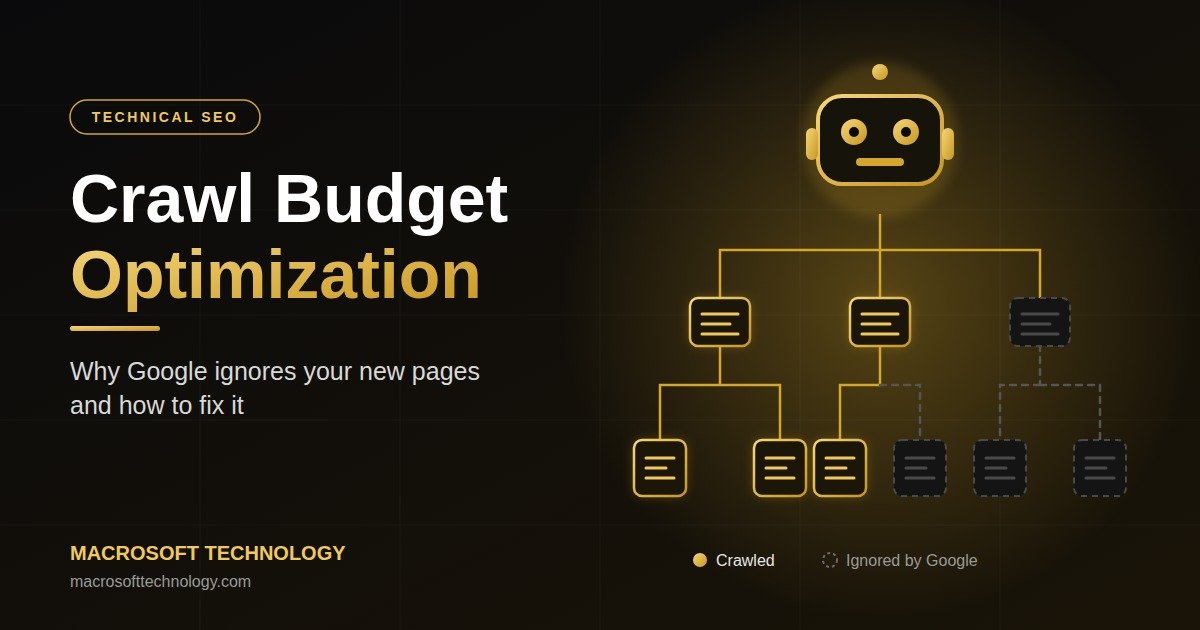
Crawl budget is the number of URLs Googlebot is willing and able to crawl on your website within a given period. Google describes it as a combination of two factors:
-
Crawl capacity limit: how much crawling your server can handle without slowing down. If your site responds fast, Googlebot can crawl more. If your server is slow or throws errors, Google backs off.
-
Crawl demand: how much Google wants to crawl your site. This depends on how popular your URLs are, how fresh your content is, and how valuable Google believes your pages are.
Put simply: Crawl budget = what your server can handle + what Google thinks is worth crawling.
If Googlebot wastes its visits on duplicate pages, broken links, endless filter URLs and redirect chains, your fresh, important pages end up at the back of the queue.

Do You Really Need to Worry About Crawl Budget?
Honest answer: not every website does. Google says crawl budget matters mainly for:
-
Very large sites (roughly 1 million+ unique pages)
-
Medium to large sites (around 10,000+ pages) whose content changes very frequently
-
Sites with a large number of URLs showing “Discovered – currently not indexed” in Search Console
If you run a 30-page business website, you will rarely hit a true crawl budget ceiling. But here is the catch: many small and medium WordPress and e-commerce sites accidentally generate thousands of junk URLs through tags, filters, internal search, session parameters and old plugins. A 50-page website can quietly become a 5,000-URL website in Google’s eyes.
That is why crawl budget optimization is relevant even for smaller businesses, especially real estate portals, e-commerce stores, education sites and blog-heavy websites.
8 Reasons Google Ignores Your New Pages
1. Slow Server Response Time
If your server takes too long to respond, Googlebot reduces its crawl rate to avoid overloading it. Cheap shared hosting, heavy plugins and unoptimized databases are the usual causes. A slow Time to First Byte (TTFB) directly shrinks your crawl capacity.
What to aim for: a server response under 200–300 ms, supported by caching and a CDN.
2. Duplicate Content and URL Parameters
When the same content is available at many URLs, Google has to crawl all of them to figure out which is the real one. Common culprits:
-
http:// vs https:// and www vs non-www versions
-
Trailing slash vs no trailing slash
-
Tracking parameters like ?utm_source= or ?ref=
-
Sorting and filter parameters like ?sort=price&color=red
Every duplicate eats into the budget that should be spent on your new pages.
3. Faceted Navigation and Infinite URL Spaces
E-commerce sites suffer the most here. A product category with filters for size, colour, brand and price can create millions of URL combinations. Calendar widgets, internal search result pages and endless pagination create the same “crawl trap” problem.

4. Orphan Pages and Weak Internal Linking
Google discovers pages by following links. If your new page is not linked from your homepage, navigation or relevant blog posts, it becomes an orphan page. Even if it is in your sitemap, Google treats pages with no internal links as low priority.
Strong internal linking is one of the cheapest and most powerful crawl signals you have. For example, if you publish a new article about technical audits, link it from your main SEO services and from related posts so Googlebot finds it fast.
5. Redirect Chains, 404s and Soft 404s
A redirect chain (Page A → Page B → Page C → Page D) forces Googlebot to make several requests just to reach one final page. Broken links and soft 404 pages (pages that look empty but return a 200 status) waste crawls and signal poor site quality.
6. Messy or Bloated XML Sitemap
Your sitemap should be a clean list of only your indexable, canonical, 200-status URLs. If it contains redirected pages, noindex pages, 404 errors or parameter URLs, Google loses trust in it and may crawl it less often.
7. Thin, Duplicate or Low-Quality Content
Crawl demand is heavily influenced by quality. If a large share of your site is thin, auto-generated or near-duplicate content, Google concludes that crawling more of your site is not worthwhile, and your good pages suffer along with the weak ones.
Quality content is the foundation of crawl demand. Our content marketing team often recommends pruning or merging weak pages before publishing new ones.
8. Technical Blockers: Robots.txt, Noindex and Heavy JavaScript
Sometimes the reason is painfully simple:
-
A Disallow rule in robots.txt accidentally blocks a folder
-
A leftover noindex tag from the staging or development phase
-
Key content or links that only appear after heavy JavaScript rendering
-
Incorrect canonical tags pointing to another page
Always rule these out first. They are fast to check and fast to fix.
How to Diagnose Crawl Budget Problems
Before fixing anything, find out what Googlebot is actually doing on your site. Use these tools in this order.
Step 1: Google Search Console Crawl Stats Report
Go to Settings → Crawl stats. Look at total crawl requests, average response time, and the breakdown by response code, file type and purpose (discovery vs refresh). If most requests go to parameter URLs, redirects or 404s, you have found your leak.
Step 2: Page Indexing Report
Open Indexing → Pages and study the “Why pages aren’t indexed” section. These statuses matter most:
|
Status |
What It Usually Means |
Typical Fix |
|
Discovered – currently not indexed |
Google knows the URL but has not crawled it yet, often due to crawl budget or low site priority |
Improve internal links, speed and overall site quality |
|
Crawled – currently not indexed |
Google visited the page but chose not to index it, usually due to quality or duplication |
Improve content depth, uniqueness and relevance |
|
Duplicate without user-selected canonical |
Google sees multiple versions of the same page |
Set clear canonical tags |
|
Page with redirect |
URL redirects elsewhere |
Remove from sitemap and update internal links |
Step 3: URL Inspection Tool
Paste your new URL into the inspection bar. Check whether it is indexed, when it was last crawled, the canonical Google selected, and whether crawling is allowed. Use Test Live URL to see how Google actually renders the page.
Step 4: Server Log File Analysis
Log files are the ultimate source of truth. They show exactly which URLs Googlebot requested, how often, and what response it got. Tools like Screaming Frog Log File Analyser help you spot patterns, such as Googlebot spending 60% of its visits on filter URLs while your new blog posts get none.
Step 5: Full Site Crawl
Crawl your own site with Screaming Frog, Ahrefs Site Audit or SEMrush Site Audit. Compare what the crawler finds against what is in your sitemap and what Google has indexed. The gaps tell you a lot.
How to Fix Crawl Budget Issues: The 10-Step Action Plan
1. Speed Up Your Server and Website
Upgrade hosting if needed, enable server-side caching, use a CDN, compress images and reduce plugin bloat. Faster responses allow Googlebot to crawl more pages in the same time. If your site architecture or code is the bottleneck, our web development team can rebuild it for speed and clean crawlability.
2. Consolidate Duplicate URLs
Pick one version of every page and enforce it using 301 redirects and self-referencing canonical tags. Standardise on HTTPS, one hostname version and one trailing-slash rule.
3. Control Parameters and Faceted Navigation
Block low-value parameter URLs in robots.txt (for example, internal search and sort parameters), and make sure filters that create thin pages are not linked in a crawlable way. Keep genuinely valuable filter pages (for example, “2 BHK apartments in Madurai”) crawlable and optimized.
Important: a noindex tag does not save crawl budget, because Google still has to crawl the page to see the tag. Use robots.txt to prevent crawling, and noindex to prevent indexing. They solve different problems.
4. Fix Redirect Chains and Broken Links
Update internal links to point directly to the final destination URL. Replace chains with a single 301. Return a proper 404 or 410 status for pages that are permanently gone.
5. Clean and Optimize Your XML Sitemap
Keep only canonical, indexable, 200-status URLs. Split large sitemaps into logical groups (blog, services, products) and keep the lastmod date accurate. Do not update lastmod unless the content has genuinely changed.
6. Build a Strong Internal Linking Structure
Make sure every important page is reachable within three clicks from the homepage. Add contextual links from high-authority pages to new content, use descriptive anchor text, and create hub pages (topic clusters) that link to related articles. For local businesses, connecting location pages with services also helps, such as linking your local SEO service page with your city landing pages.
7. Prune or Improve Thin Content
Audit pages with zero traffic and zero links. For each one, decide whether to improve it, merge it into a stronger page (with a 301), or remove it. A leaner site with higher average quality earns more crawl demand.
8. Eliminate Orphan Pages
Compare your sitemap list with your crawl data. Any page that appears in the sitemap but is not found by the crawler is an orphan. Link to it from relevant pages or remove it.
9. Make Sure Your Content Is Render-Friendly
Important text, links and navigation should be available in the initial HTML wherever possible. If you rely on JavaScript frameworks, use server-side rendering or pre-rendering so Googlebot does not need extra resources to see your content.
10. Request Indexing Wisely and Keep Publishing Consistently
Use the Request Indexing option in the URL Inspection tool for your most important new pages, but do not spam it. Google’s Indexing API is officially meant only for job postings and livestream content, so do not rely on it for normal pages. Consistent publishing and updating also trains Googlebot to visit more often.

Crawl Budget Quick Checklist for WordPress Websites
Most small business sites in Tamil Nadu run on WordPress, so here is a fast checklist you can apply today:
-
Disable or noindex unnecessary tag, author and date archive pages
-
Turn off internal search result indexing
-
Remove unused plugins and heavy page builders where possible
-
Enable caching and image compression
-
Use an SEO plugin to manage canonicals and sitemaps properly
-
Delete old test pages, demo content and “Hello World” defaults
-
Fix all 404 errors found in Search Console
-
Make sure staging sites are blocked and never linked

Common Crawl Budget Mistakes to Avoid
-
Using crawl-delay in robots.txt for Google. Googlebot ignores the crawl-delay directive.
-
Blocking CSS and JS files. Google needs them to render your pages correctly.
-
Relying on noindex to save crawl budget. It does not stop crawling.
-
Submitting huge sitemaps full of low-quality URLs. This reduces trust in your sitemap.
-
Ignoring server errors. Frequent 5xx errors make Google slow down crawling significantly.
-
Publishing hundreds of thin pages at once. Quality over quantity always wins.
How Long Does It Take to See Results?
After fixing crawl issues, you will often see improvements in the Crawl Stats report within a few weeks, such as fewer wasted requests and faster discovery of new URLs. Indexing improvements for new pages typically follow within 2 to 8 weeks, depending on your site’s authority and size. Be patient, keep monitoring Search Console, and re-check your problem URLs regularly.
If your traffic has already dropped because of indexing or crawling issues, read our guide on what to do when website traffic drops suddenly to diagnose the broader causes.
Frequently Asked Questions (FAQ)
1. What is crawl budget in SEO?
Crawl budget is the number of pages Googlebot can and wants to crawl on your website in a given time. It is determined by your server’s capacity (crawl capacity limit) and how valuable Google considers your content (crawl demand). Optimizing it ensures Google spends its time on your most important pages.
2. Why is Google not indexing my new pages?
Common reasons include slow server response, weak internal linking, duplicate or thin content, a messy sitemap, accidental noindex or robots.txt blocks, and low overall site quality. Check the Page Indexing report in Google Search Console to see the exact status for each URL.
3. How do I check my crawl budget?
Open Google Search Console, go to Settings and then Crawl stats. There you can see total crawl requests, average response time and response code breakdown. For deeper insight, analyse your server log files with a tool like Screaming Frog Log File Analyser.
4. Does crawl budget affect small websites?
True crawl budget limits mainly affect very large sites. However, small websites can still face problems if they unintentionally create thousands of duplicate or low-value URLs through filters, tags, parameters or search pages. Cleaning these up helps any site get new content discovered faster.
5. Does site speed improve crawl budget?
Yes. A faster and healthier server increases your crawl capacity limit, which means Googlebot can fetch more pages without overloading your site. Faster pages also improve user experience and Core Web Vitals, which supports your overall SEO performance.
Conclusion
When Google ignores your new pages, it is rarely random. It is a signal that Googlebot is spending its limited time somewhere else, or that it does not yet see enough value, speed or structure on your site to prioritise your content. By fixing server performance, cleaning duplicate URLs, tightening your sitemap, strengthening internal links and raising overall content quality, you make every Googlebot visit count.
Crawl budget optimization is not a one-time task. It is an ongoing part of a strong technical SEO strategy. If you want to learn these techniques hands-on, our Practical SEO Training program covers technical audits, Search Console and log analysis step by step.
Is Google Ignoring Your New Pages? Let Us Fix It.
At Macrosoft Technology, our technical SEO experts audit your crawl health, indexing status, site speed and internal linking, and give you a clear roadmap to get your pages discovered and ranking faster. Looking for a trusted digital marketing agency in Madurai? We serve businesses across Tamil Nadu.
👉 Contact Us Today for a Free Consultation and SEO Audit
📞 +91 75300 08089 | +91 75300 08088
📧 macrosofttechnology.ms@gmail.com
📍 Krishnapuram Colony, Viswanathapuram, Madurai, Tamil Nadu 625014
🕘 Mon – Sat: 9:00 AM – 7:00 PM